PC NVR not recording video

Have some questions or having issues with Amcrest Surveillance Pro? Post them here for the mods and other users to assist you.
Post Reply
dolandr
Posts: 3
Joined: Wed Jan 28, 2026 7:57 pm

PC NVR not recording video

Post by dolandr »

I am using Intelligent Analyze with Tripwire and have Video Detect off. Which I assume is the same as Motion Detection in the web UI and Android app.

To record, I'm using the PC NVR option for now 'til I get an actual NVR. It shows up fine in the Devices window with the green light on. I am able to see snapshots of tripwire events but no video recordings.

I get an alert that says "Tripwire" and the window show up on my laptop. But nothing plays. In the Event Log, I see the tripwire event and I am able to click on the picture icon and see a snapshot. But when I click on the movie reel icon, I get the message: No records were found.
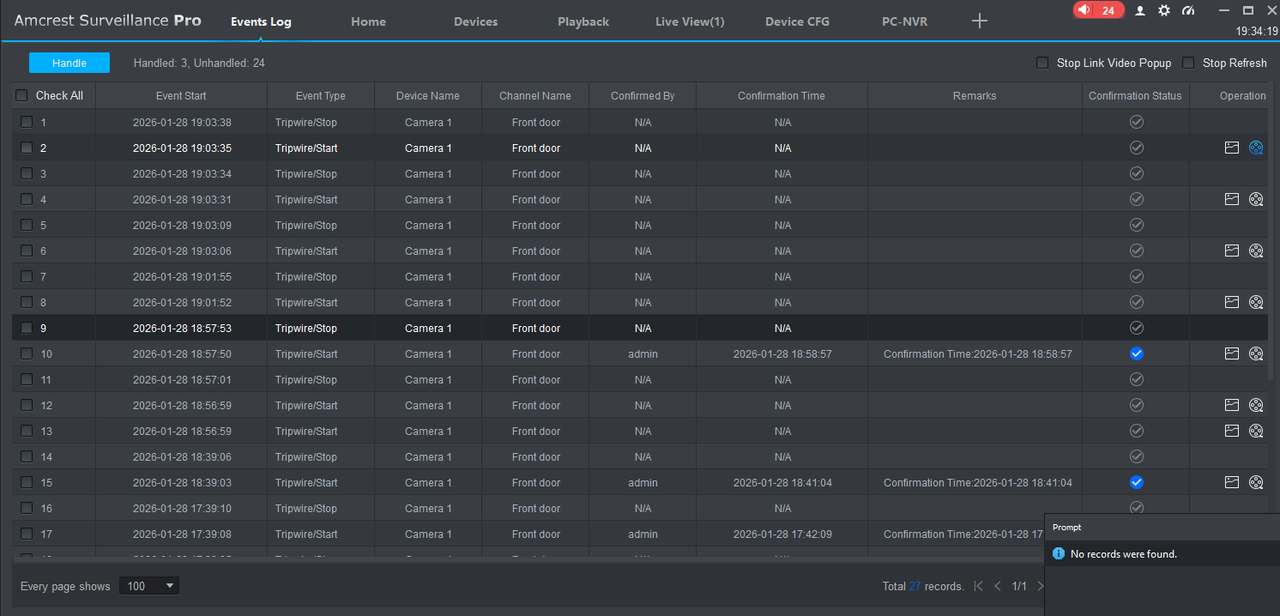
Image

And I don't see any recordings in the Record folder in Windows. Any suggestions as to why it is not recording video?
dolandr
Posts: 3
Joined: Wed Jan 28, 2026 7:57 pm

Re: PC NVR not recording video

Post by dolandr »

ok so I think I know why. This morning when I tested the tripwire I went back inside and saw that upon clicking on the movie reel, I get the submenu with the camera and pc-nvr, and when I click on one, I actually see the video of me tripping the tripwire!

So, I gather that it does not record video becuase the laptop was asleep. Now in the event log, there are two entries for each event; camera and nvr. It's the same video, how can I turn off nvr so that only camera show there?
Post Reply